
Oil and Gas Software Requirements Checklist: What Operators Should Prepare Before Choosing a Vendor

Summary
×Start With Requirements, Not Features
Before selecting oil and gas software, many operators face the same issue: internal requirements are not clear enough. Accounting, operations, production, land, owner relations, and management may all have different workflow pain points. Without a shared checklist, a vendor demo can quickly become a broad feature presentation instead of a focused fit assessment.
A practical requirements checklist helps operators ask better questions before a demo, proposal, or implementation estimate. It does not need to replace a formal RFP, but it should give the vendor enough context to understand the operator’s real workflows. A vendor’s ability to answer these questions often reveals more than a polished product presentation.
The best starting point is not “What features does the software have?” It is “Which operating problems do we need the system to solve?” That shift helps teams evaluate workflow fit, implementation effort, customization risk, reporting value, and long-term usability more clearly.
Confirm Who Should Be Involved
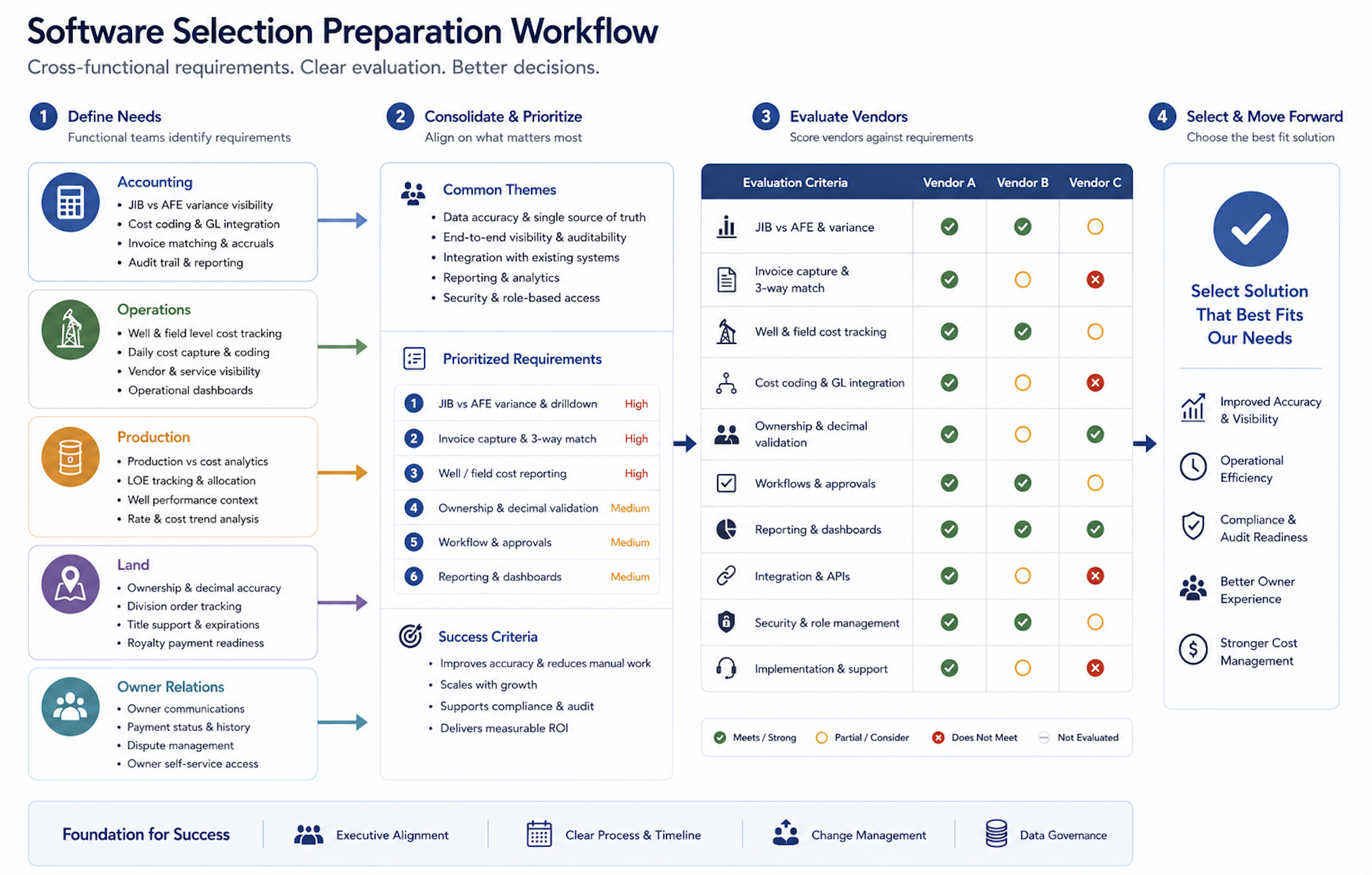
Before speaking with a vendor, operators should identify which teams will use the system, provide data, approve workflows, or rely on reporting. Oil and gas software is rarely a single-department tool. It usually connects finance, field activity, production, ownership data, payments, reporting, and management visibility.
The buying team should usually include accounting or finance, operations, production, land, owner relations, management, and IT where relevant. Each team sees a different part of the workflow: month-end close, field cost capture, production reporting, owner records, approvals, permissions, or executive reporting. Including the right users early helps prevent a system from looking strong in a demo but failing in daily work.
Operators should ask the vendor:
Which teams will use the system directly?
Which teams will only view reports or dashboards?
Does the system support role-based permissions?
Can accounting, operations, and management work from the same data?
How does the system scale when we add wells, entities, owners, or users?
Document Current Workflow Problems
Operators should describe current workflow issues in specific terms before evaluating software. Instead of saying “we need more efficiency,” explain which processes are slow, which data does not match, which reports are manually built, and which approvals regularly get stuck. This helps the vendor evaluate real workflow fit instead of demonstrating generic functionality.
The current-state review should include issues such as slow month-end close, JIB errors, royalty payment delays, spreadsheet-heavy workflows, duplicate data entry, difficult reporting, and unclear approval paths. For each issue, the operator should know where the delay starts, which team owns the data, which files are used, and what happens when the process fails.
Operators should ask the vendor:
Can you map our current workflow and identify what can be systemized?
Which issues can be solved with standard functionality?
Which issues require configuration?
Which issues require custom development?
Which workflows may still require Excel after go-live?
Confirm Core Oil and Gas Workflows
The vendor must understand which oil and gas workflows the operator actually needs to manage. Some operators are focused on JIB and accounting. Others need stronger production reporting, owner data control, royalty payments, field-to-office workflows, or management reporting.
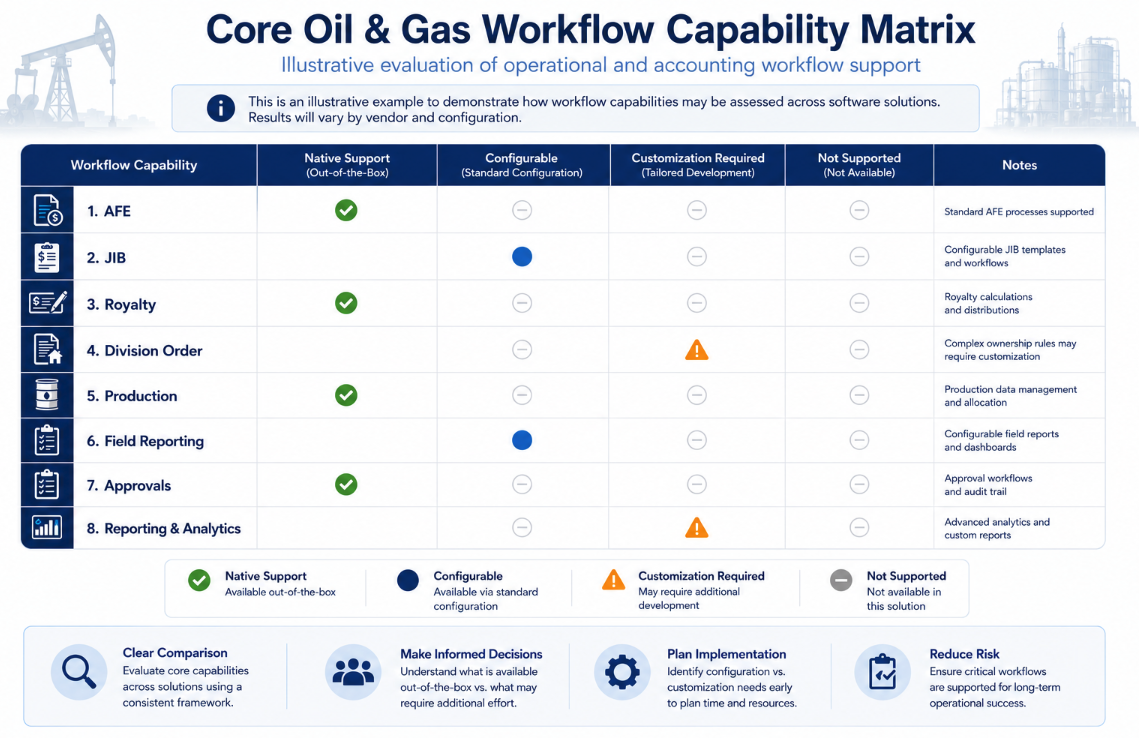
Operators should confirm whether the system supports well and lease management, AFE management, JIB management, royalty management, division order workflows, production reporting, field operations, approvals, and reporting. These capabilities should not be discussed only as feature names. The vendor should show how each workflow works with real operating data, real approval paths, and realistic exceptions.
Operators should ask the vendor:
Which oil and gas workflows are natively supported?
Which workflows require configuration or customization?
Can the system connect field data to accounting?
Can AFE, JIB, royalty, production, and reporting data sit in one connected structure?
Can the system report by well, lease, owner, project, entity, and cost category?
Prepare Data Before the Demo
A vendor needs to understand the operator’s data structure before estimating implementation effort. Even if the operator is not ready to provide full data sets, sample files and data categories are useful. Good sample data helps the vendor show realistic workflows instead of generic screens.
Operators should prepare sample well and lease lists, owner records, division order information, accounting data, recent JIB statements, royalty statement examples, production data, approval workflows, and monthly reports. These samples do not need to be perfect, but they should reflect the real structure and complexity of the business. If the company currently uses spreadsheets, legacy systems, or paper files, those sources should also be identified early.
Operators should ask the vendor:
What sample data do you need to estimate implementation scope?
Who is responsible for data migration?
How will data from legacy systems, Excel, and paper files be cleaned?
How will imported data be validated?
How will duplicate, incomplete, or inconsistent records be handled?
Separate Standard, Configuration, and Custom Work
Operators should clearly separate standard functionality, configuration, and custom development. Standard functionality usually supports faster implementation. Configuration adapts the system to the business, while custom development may add cost, timeline, and long-term maintenance responsibility.
This distinction should be documented before the operator accepts a proposal. A requirement that sounds simple during a sales call may require development once implementation begins. Operators should ask the vendor to classify important requirements as standard, configurable, or custom so there is less confusion later.
Operators should ask the vendor:
Which features can be used without development?
Which fields, reports, workflows, and approvals can be configured?
Which requirements require custom development?
How are custom development timelines and costs estimated?
Will future workflow changes create extra cost?
Can internal admins maintain the configuration after implementation?
Clarify Integration and Source-of-Truth Decisions
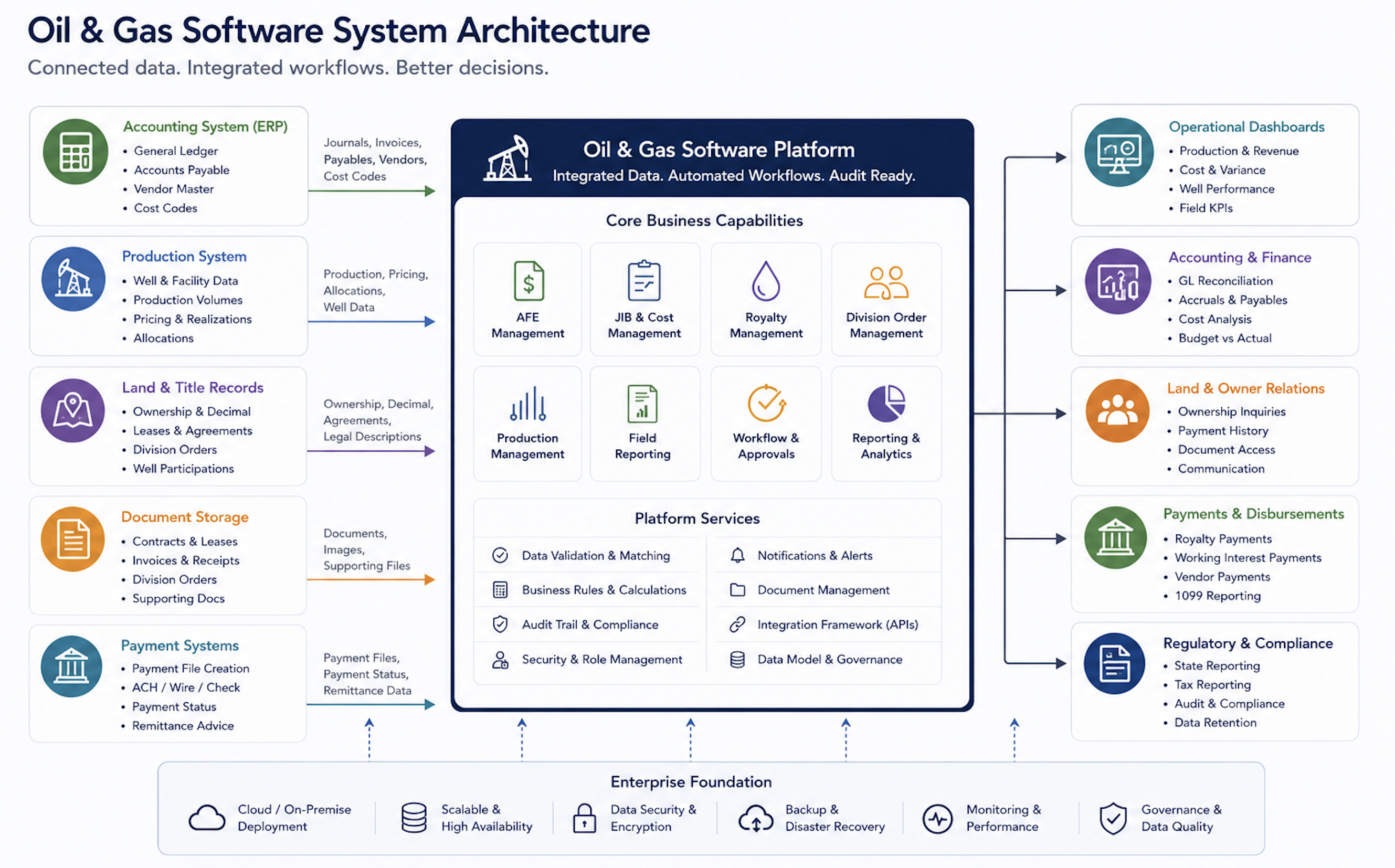
Many oil and gas companies already use accounting, production, land, document storage, payment, or reporting tools. New software does not always need to replace every system, but the role of each system must be clear. Without that clarity, the company may add another platform without reducing manual work.
Operators should identify whether the new system needs to connect with accounting systems, production systems, land and owner records, document storage, reporting tools, bank or payment systems, and email notifications. They should also decide which system will serve as the source of truth for each data type. This prevents the same owner, cost, production, or payment data from being maintained in multiple places without control.
Operators should ask the vendor:
Does the system have APIs or standard integration options?
Which integrations have you already completed?
Which integrations would need new development?
Is data synchronization real-time, scheduled, or manual?
Which system will be the source of truth for each data type?
How does the system alert users when an integration fails?
Define Reporting and Management Visibility
Usability often depends on whether the system gives teams and management the right visibility. Operators should not only ask whether the software can generate reports. They should ask whether reporting can be filtered by the business dimensions that matter in oil and gas operations.
Cost reporting should be available by well, lease, AFE, cost category, vendor, and period. JIB reporting should show working interest owner, project, billing cycle, and variance information. Royalty reporting should support owner, property, decimal interest, payment status, and suspense visibility. Management dashboards should also show pending approvals, missing data, payment holds, cost variance, and operational status without manual report building.
Operators should ask the vendor:
Can reports be filtered by well, lease, owner, entity, and cost category?
Can users customize report fields?
Can dashboards show pending approvals, missing data, and payment holds?
Can the system show AFE budget versus actual cost?
Can the system highlight JIB or royalty payment exceptions?
Can management see cash flow, cost variance, and operating status without manual exports?
Confirm Security and Implementation Responsibility
Oil and gas software handles financial, owner, payment, and operating data, so permission control matters. Operators should confirm what each user can view, edit, approve, and release. Critical fields such as owner data, decimal interest, payment status, and cost allocation should have audit history.
Implementation planning is equally important. Many projects struggle because data migration, workflow setup, user training, and go-live support are not clearly defined. Operators should know which modules are included, which reports will be delivered, which integrations are part of the project, what internal resources are required, and what support is available after go-live.
Operators should ask the vendor:
Which fields support change history?
Can unauthorized users be prevented from changing payment-related data?
Can permissions be assigned by role, department, or entity?
Does the system support MFA, SSO, role-based access, and backup controls?
Can we launch core modules first and expand later?
What training is provided for accounting, operations, field users, and management?
What support is provided after 30, 60, and 90 days?
Send Demo Questions in Advance
Operators should also send workflow questions before the demo. This encourages the vendor to demonstrate real processes instead of standard screens. It also helps the buying team quickly identify whether the vendor understands oil and gas operations. Modern agile procurement replaces theatrical software presentations with practical stress-testing of core data visualization architectures. When a platform possesses true oil and gas software scalability, its engineers can instantly configure the system on the fly to mirror your company’s unique spatial data and asset parameters without requesting a weeks-long tech project.
A useful demo should show the vendor working through practical scenarios, not only clicking through menus. The operator should ask to see how a field cost enters the system, how it is assigned to a well or AFE, how it moves through approval, how it affects JIB or royalty workflows, and how management can see exceptions before month-end.
Ask the vendor to demonstrate:
How a field cost enters the system and gets assigned to the correct well, lease, or AFE
How a vendor invoice moves through approval and into accounting
How a cost becomes a JIB charge
How a royalty owner payment is calculated using owner data and decimal interest
How the system controls owner data changes and payment impact
How production data flows into reporting or revenue workflows
How management reviews cash flow, cost variance, and operational status
Where Petrofly Can Help
Petrofly can support operators that want oil and gas software to fit real workflows rather than force every team into a generic system structure. Its value is most relevant when operators need connected accounting, operations, JIB, royalty, owner data, reporting, and approval workflows with a practical adoption path.
Petrofly can help through:
Workflow fit: Connect wells, costs, production, JIB, royalty, owner data, and reporting in a more organized structure.
Modular rollout: Start with priority workflows first, then expand as the team is ready.
Cloud-based access: Support secure browser-based usage without heavy local installation.
Customer-specific configuration: Adjust fields, reports, dashboards, approvals, and workflows around how the operator actually works.
Dedicated support: Assist with onboarding, data setup, user training, workflow refinements, and post-go-live questions.
Practical cost fit: Improve the workflows that matter most first without overbuilding the software environment from day one.
For operators evaluating vendors, Petrofly’s role is not simply to show more features. It is to help teams define a workable implementation path, keep key workflows connected, and support adoption after the system goes live. Fragmented daily petroleum workflows freeze critical capital when accounting and field operations operate in separate data silos. The Petrofly platform acts as the continuous digital spine for your entire organization, backing user training and workflow optimizations long past the initial go-live milestone to secure permanent financial discipline.
Choose the Vendor Around the Workflow
Before signing, operators should require the vendor to document requirements, assumptions, configuration scope, custom development scope, implementation responsibilities, training, data migration, integrations, reporting, permissions, and post-go-live support. Do not rely only on a sales demo or verbal promises. Oil and gas workflows should be tested against real data, real approvals, real exceptions, and real reporting needs.
The strongest software decision starts before the demo. Operators should understand which workflows need improvement, which data must be cleaned, which reports matter, which integrations are required, and which responsibilities belong to the vendor or internal team. This makes vendor evaluation more practical and reduces the risk of choosing software that looks strong in a presentation but falls short during implementation.
For oil and gas operators, the right system should connect the work that actually drives daily operations: accounting, field activity, production, ownership, JIB, royalty, reporting, approvals, and management visibility. When those requirements are clear before selection, the vendor conversation becomes more focused, implementation becomes easier to plan, and the final system is more likely to support the business after go-live.
To discuss how a practical oil and gas software requirements review could support your vendor selection process, contact our team for a focused conversation. Relying solely on a vendor’s glossy marketing brochures frequently blinds procurement committees to the crippling technical deficits hidden beneath the surface. Our industry experts are prepared to help you pressure-test every vendor proposal against your live operational bottlenecks, transforming an adversarial software selection process into a highly predictable, risk-mitigated corporate triumph.