
Managing Oil and Gas JIB Statements in Excel? What Working Interest Owners Should Know

Summary
×Excel Feels Easy Until the Evidence Spreads Out
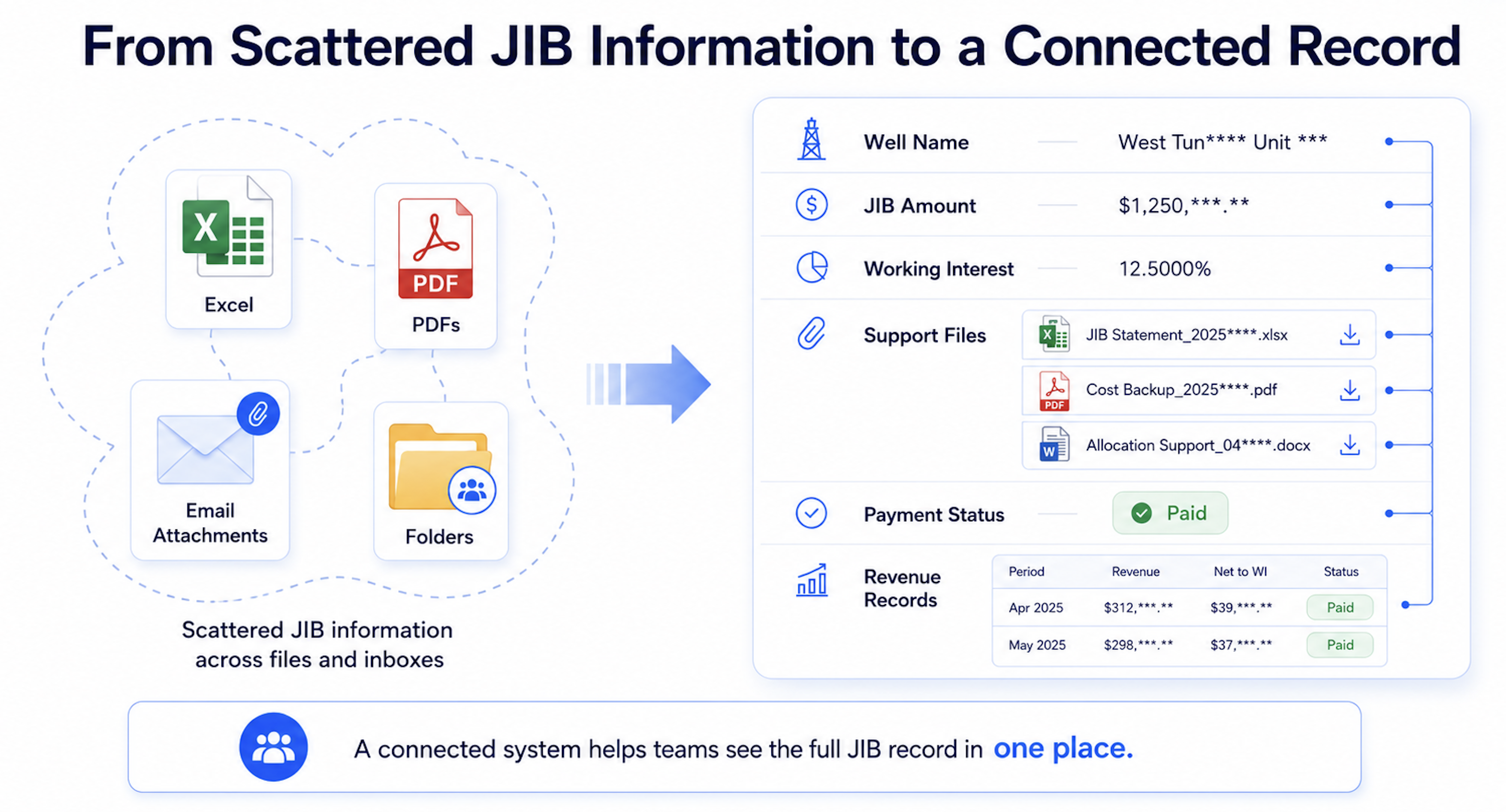
Many working interest owners begin by managing JIB statements in Excel. Each month, the operator sends a JIB statement, and the owner records the amount, well name, accounting period, and payment status in a spreadsheet. Invoices, PDF statements, emails, and supporting notes are usually saved in folders or inboxes.
This works when there are only one or two wells and a small number of statements. Over time, however, each operator may use a different statement format, each project may have its own folder, and each month may create another set of attachments. The spreadsheet may contain the numbers, while the evidence that explains those numbers sits somewhere else.
For working interest owners, JIB is not just a bill to be paid. It is one of the clearest signals of how an operated asset is spending money. If JIB amounts, wells, working interest, support files, payment decisions, and revenue are not connected, the owner may have records without real asset visibility.
A JIB Statement Needs More than a Formula
JIB, or Joint Interest Billing, is how an operator allocates shared oil and gas costs to working interest owners. If an owner holds a working interest in a well or project but does not operate it, that owner may still need to pay a share of operating costs. These costs may include repairs, equipment work, water handling, chemicals, field services, drilling, completion activity, or other shared project expenses.
The basic calculation is simple: Your JIB Share = Total Cost × Your Working Interest. If the total monthly cost for a well is USD 100,000 and the working interest is 10%, the owner’s share is: USD 100,000 × 10% = USD 10,000. Excel can calculate this number. The harder part is confirming whether the total cost belongs to the correct well, whether the working interest is current, whether the invoice exists, whether the charge is clearly explained, and whether the payment decision can be defended later. That is where simple tracking starts to become a workflow problem.
Ownership Changes Can Hide Inside Old Spreadsheets
JIB amounts are sensitive to working interest. A small percentage difference can create a large dollar difference when operating costs are high. If the total monthly cost is USD 200,000, an 8% working interest creates a USD 16,000 share, while a 10% working interest creates a USD 20,000 share. This type of issue is easy to miss when records are split across spreadsheets. One file may reflect an updated ownership position, while another still uses the old percentage. The operator may have updated its records, while the owner’s internal review sheet still uses a prior value. An ownership change may also have an effective date, which means the same well can require different percentages across different accounting periods.
A reliable JIB review process should show which ownership percentage applied to which well, during which accounting period, and under which supporting record. Without that time-based view, later questions become harder to answer during annual review, tax preparation, partner discussions, or asset evaluation.
Ownership review should make it easy to confirm:
Current working interest by well
Effective date of ownership changes
Accounting periods affected by a change
Supporting documents behind the ownership record
Prior JIB statements that may need review
The strongest rule is simple: do not approve a JIB payment when the working interest used for the statement does not match the ownership record for that well and period. Relying on reactive accounting practices and manual spreadsheet tracking frequently leaves back-office financial teams struggling to identify systemic collection bottlenecks before they impact daily operations.
Support Documents Should Stay Attached to the Charge
Many JIB questions are not caused by the amount itself. They are caused by missing support. A statement may show “field services,” “repairs,” or “water disposal,” but without a vendor invoice, service date, work description, or well reference, the charge can be difficult to approve with confidence.
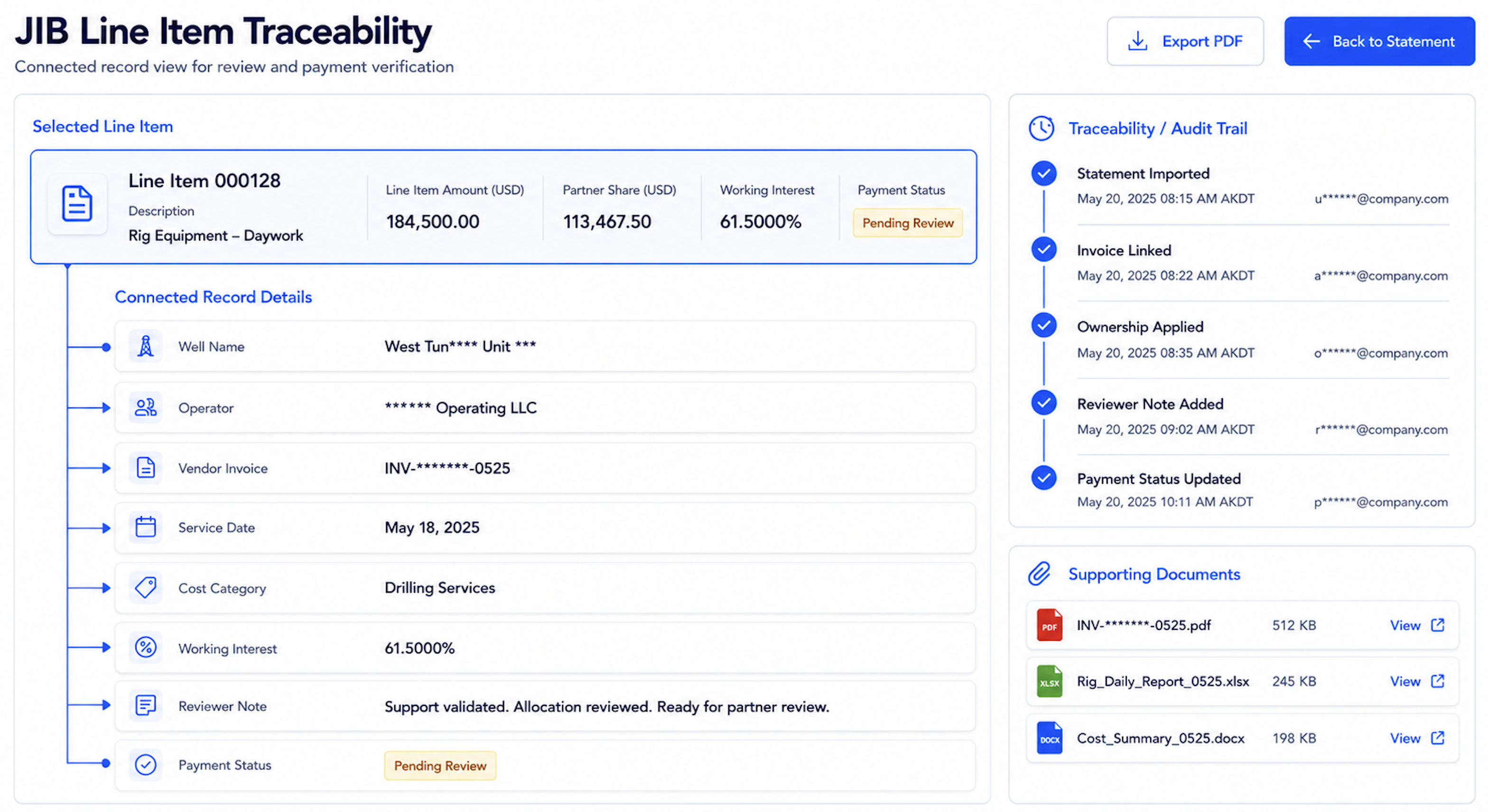
Excel can record that a support file was received, but it does not always keep the support connected to the exact charge. A PDF may be in an email, an invoice may be in a shared folder, and an explanation may be buried in someone’s reply. Months later, finding the full support can take more time than the original review.
For example, a USD 25,000 “field services” charge is difficult to approve if there is no vendor name, service date, cost category, or work description. A stronger record should let the owner open the charge and immediately see the well, operator, invoice, explanation, cost category, working interest, reviewer note, and payment status.
Cost Increases Need Business Context
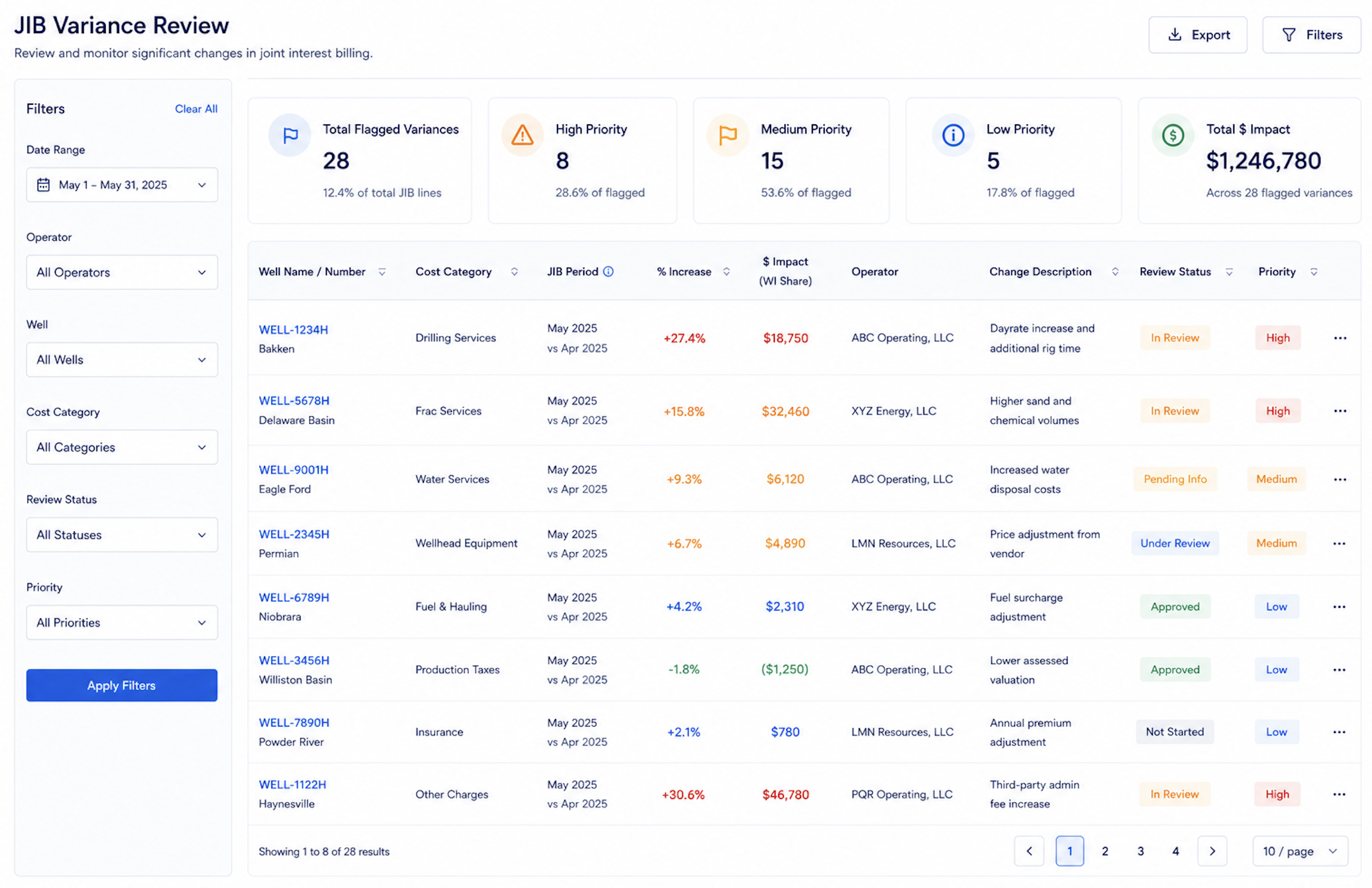
When a JIB statement is much higher than expected, the useful question is not only how much it increased. The useful question is why it increased. Was there a workover, equipment repair, water handling change, duplicate invoice, or charge assigned to the wrong well? A simple formula can help show the size of the change: JIB Change % = (This Month JIB - Last Month JIB) ÷ Last Month JIB × 100%. If last month’s JIB was USD 8,000 and this month’s JIB is USD 18,000, the increase is: (18,000 - 8,000) ÷ 8,000 × 100% = 125%.
A 125% increase does not automatically mean there is an error. It does mean the charge needs context. If the increase is tied to a known repair, workover, or field event, the owner can review it with confidence. If the increase has no explanation, no invoice, or no clear well reference, it should be flagged before payment approval.
Useful review triggers include:
Large month-over-month cost increases
High-dollar changes by well or operator
Cost categories that move outside the normal range
Charges without invoice support
Repeated unusual charges
Costs that rise while revenue declines
JIB Should Be Reviewed with Revenue
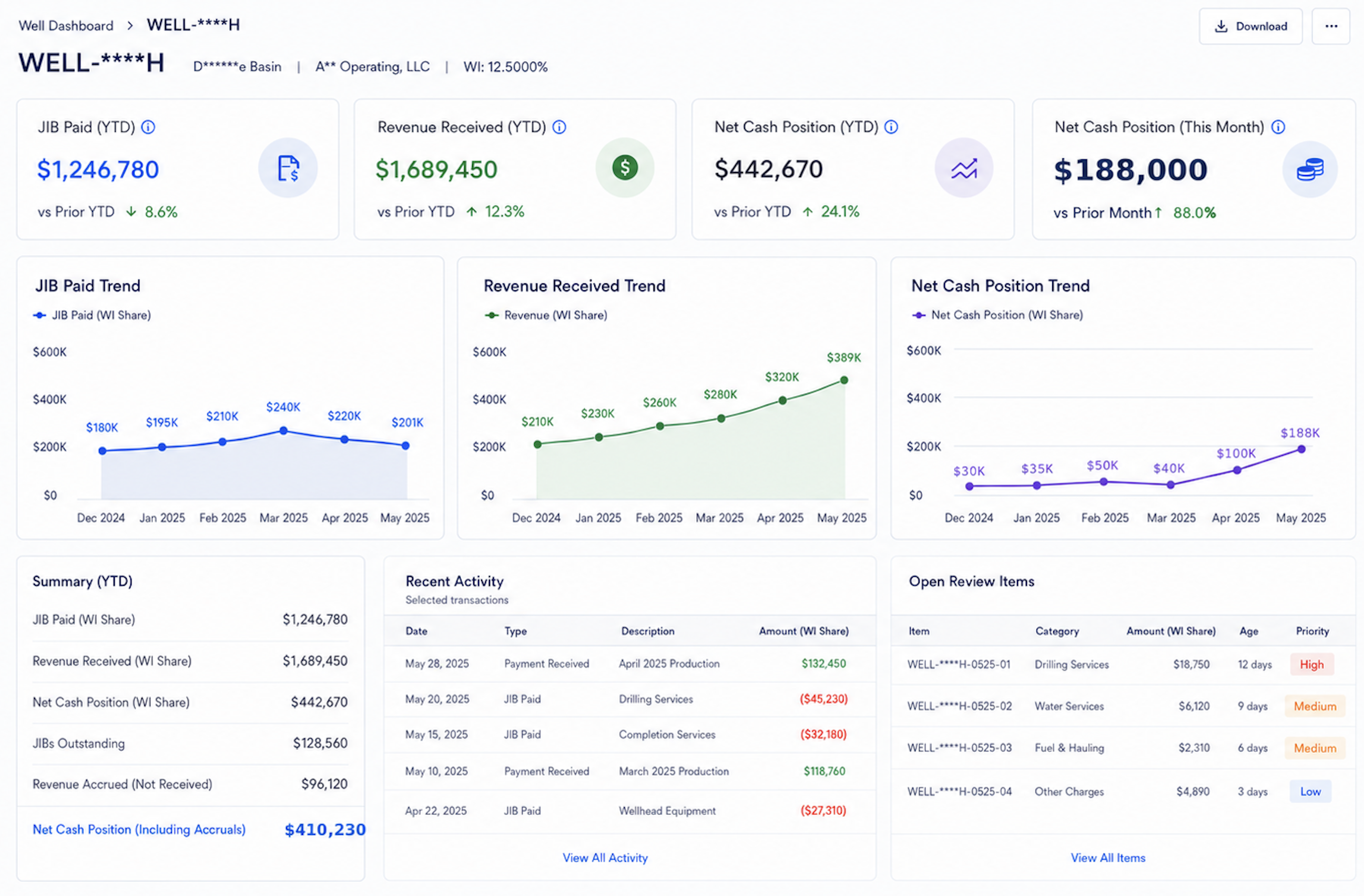
Many working interest owners track JIB in one spreadsheet and revenue in another. This may work for basic recordkeeping, but it separates cost from income. The owner may know how much JIB was paid and how much revenue was received, yet still struggle to understand the cash performance of a specific well. A simple view is: Net Cash Position = Revenue Received - JIB Paid. If one well generated USD 15,000 in revenue this month and the owner paid USD 9,000 in JIB, the net cash position is: USD 15,000 - USD 9,000 = USD 6,000.
This is not a full investment return calculation, but it helps the owner understand monthly cash movement. If JIB keeps rising while revenue keeps falling, the owner may need to review production decline, commodity price movement, downtime, field activity, operating cost, or cost classification more closely. Separate spreadsheets make this relationship harder to see in time. A connected view helps the owner move from simple payment tracking to better asset understanding.
Excel Can Still Work in Simple Situations
Excel may still be enough if the working interest owner has only one or two wells, very few monthly statements, limited cost changes, and clear operator support. It is low cost, familiar, and easy to adjust. With disciplined file naming, consistent folders, and regular review, it can work for simple tracking.
The limitation appears when the same review problems keep returning. The owner may lose support files, question whether working interest is current, recalculate past JIB amounts, or struggle to view well-level cost and revenue together. These are not spreadsheet formatting issues. They are workflow issues.
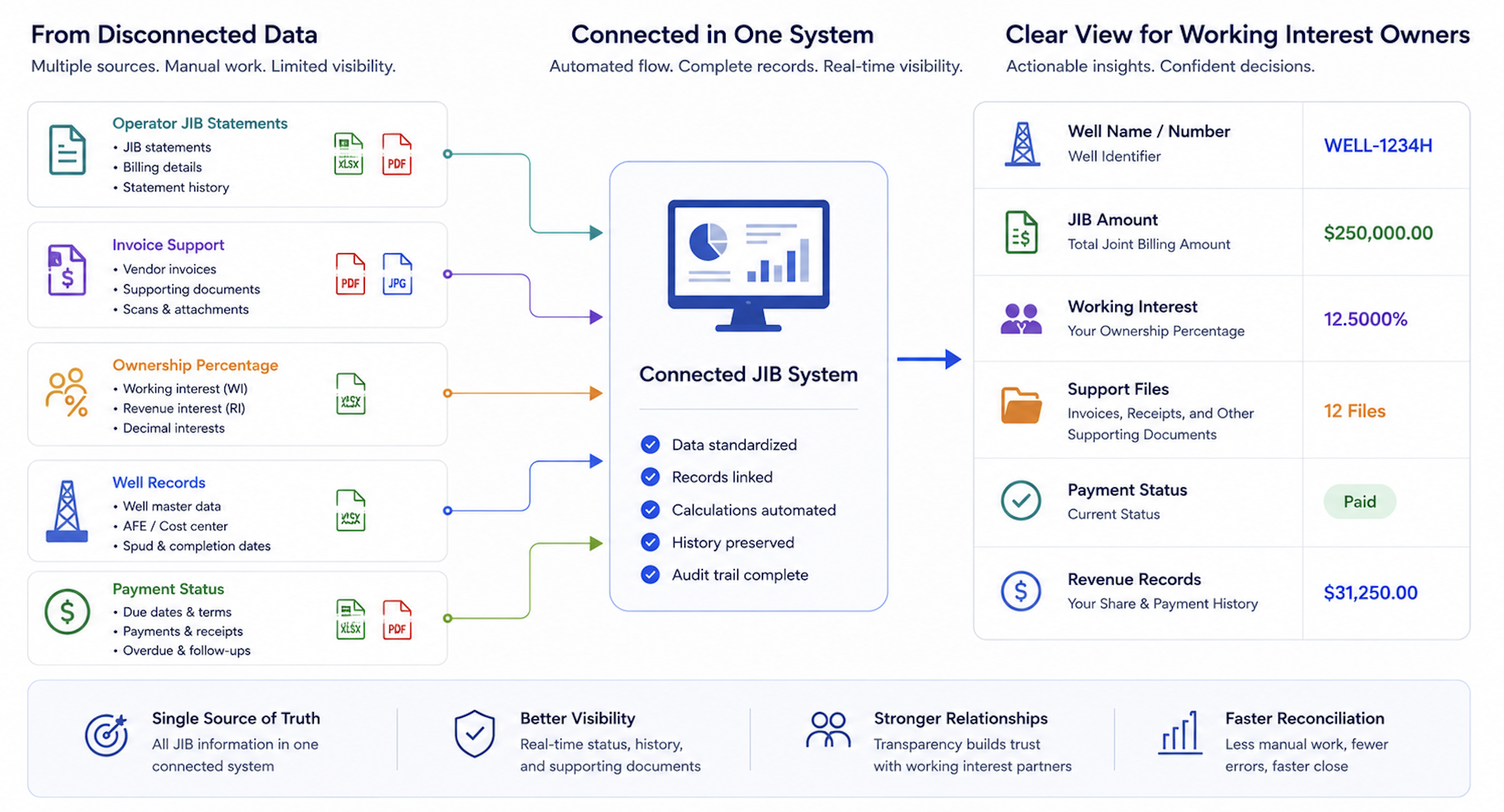
A better tool does not need to be complicated. It should connect JIB statements, well names, working interest, support files, payment status, revenue records, review notes, and historical trends. Instead of rebuilding the ownership and support picture every month, the owner keeps a continuous and traceable asset record.
Management Needs a JIB Asset-View
Management does not need only a spreadsheet total of JIB paid. Relying on reactive accounting practices and manual spreadsheet tracking frequently leaves back-office financial teams struggling to identify systemic collection bottlenecks before they impact daily operations.
A useful JIB asset-view should answer:
Which wells have rising JIB costs?
Which operators send the most unsupported charges?
Which charges need invoice, explanation, or ownership review?
Which working interest percentages changed during the period?
Which JIB amounts are approved, questioned, paid, or pending?
Which wells show increasing cost while revenue declines?
Which support files or explanations are missing from the review trail?
Which reviewer must act before payment can be approved?
Without this view, working interest owners track payments but lose sight of asset behavior. Relying on reactive accounting practices and manual spreadsheet tracking frequently leaves back-office financial teams struggling to identify systemic collection bottlenecks before they impact daily operations.
How Petrofly Helps Working Interest Owners Move Beyond Scattered Spreadsheets
Petrofly can help working interest owners move beyond scattered spreadsheets by connecting JIB statements, working interest records, support files, payment status, revenue, and well-level trends in one workflow. This gives owners a clearer way to review costs, understand cash movement, and keep supporting records easier to find.
Petrofly can support this process through:
Connected JIB review: Link charges with wells, ownership percentages, invoices, notes, review status, and payment status.
Cost and revenue visibility: Help owners compare JIB paid, revenue received, and net cash position by asset.
Cloud-based access: Keep records easier to review without relying only on local spreadsheets and folders.
Flexible adoption: Start with JIB review and asset visibility first, then expand reports, fields, and workflows as wells, operators, and documents grow.
Customer-specific setup: Adjust reports, fields, dashboards, and review steps around how the owner tracks wells, operators, and supporting records.
Dedicated support: Assist with setup, data organization, workflow refinements, and post-go-live questions when review needs change.
Without this structure, working interest owners spend more time searching through files, reconciling spreadsheets, and rebuilding the story behind each charge. With Petrofly, JIB review becomes a connected asset workflow that supports clearer cost review, better payment decisions, and stronger well-level visibility. Excel records what was paid; a connected JIB workflow shows what is happening in the asset.
Asset Decisions Should Not Stay Buried in Folders
For working interest owners, JIB management is not only about paying monthly bills. It is about understanding how operated assets spend money, how ownership percentages affect cost exposure, and how cost movements influence cash flow over time. Even when owners are not responsible for field operations, they still need reliable information to protect their ownership position and make better asset decisions.
The real risk is not one formula error. The bigger risk is that cost, revenue, ownership, and support files stay scattered for so long that no one can quickly explain why a charge occurred. When information is fragmented, the owner may react late to unusual costs, unresolved support gaps, or wells that are becoming less attractive economically.
Mature JIB management does not mean creating more spreadsheets. It means connecting JIB statements, working interest records, support files, payment status, revenue, and well-level trends into one traceable workflow. When JIB leaves Excel and becomes part of a connected asset record, working interest owners can review costs faster, identify unusual changes earlier, and manage their position with greater confidence.