
Oil and Gas Production Reporting Software: Connecting Field Data, Revenue, and Management Visibility

Summary
×Production Data Is an Operating Signal, Not a Monthly File
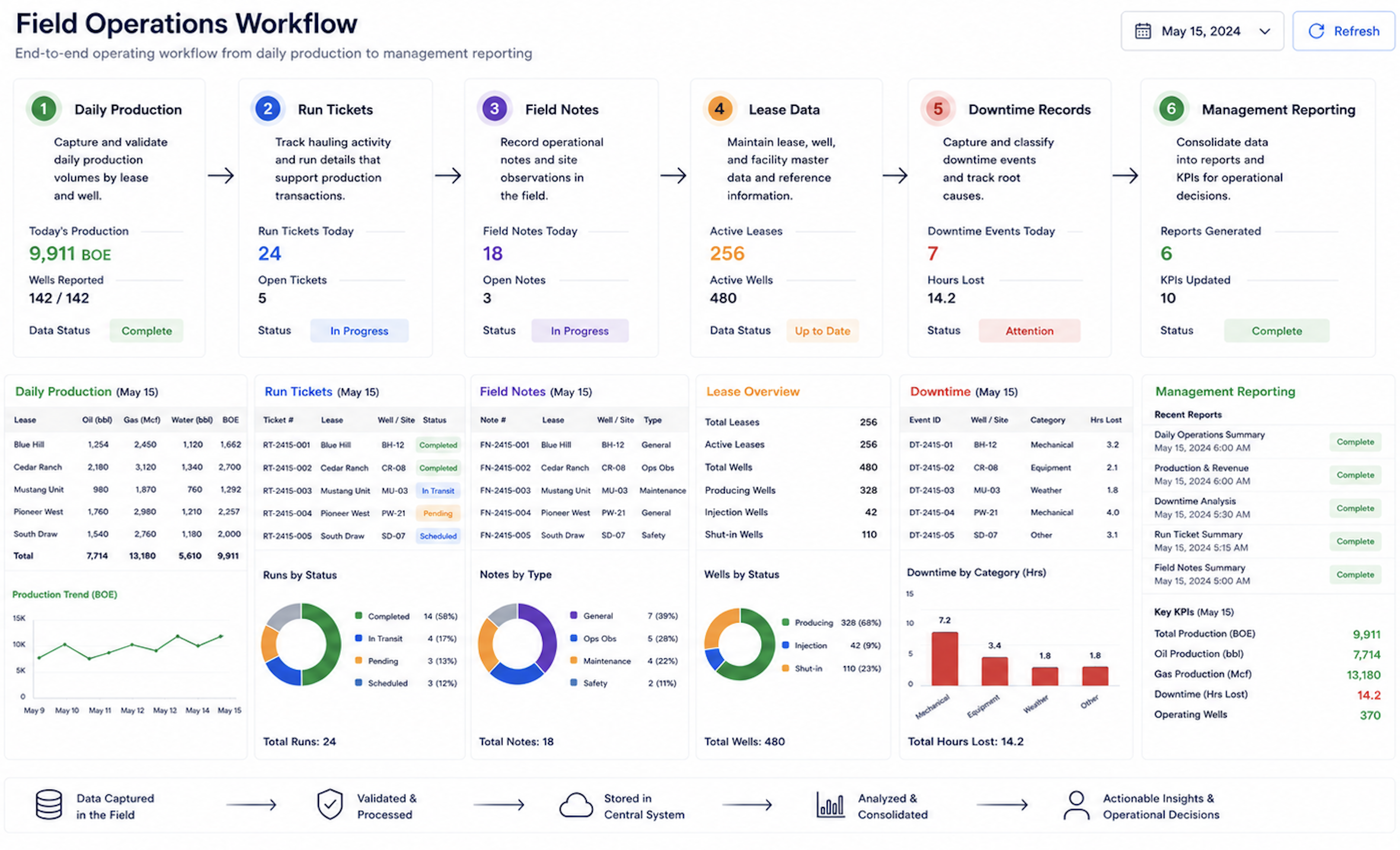
Production reporting is often treated as a required monthly record, but the data carries operating meaning long before the report is finalized. Daily production, run tickets, downtime notes, tank levels, field activity, chemical usage, lease inspections, and operator comments can explain why a well’s revenue changed, why LOE moved, or why a field needs closer review. If those records arrive late or stay disconnected, production reporting becomes a historical file instead of an operating tool.
The issue is not only whether production volume was recorded. The more important question is whether the team can understand what changed and what action should follow. A well with declining production, rising chemical usage, and repeated downtime needs a different review than a well with stable output and one late run ticket. A lease with flat production but rising operating expense may point to cost control, not reservoir performance.
A mid-size operator reviewing hundreds of monthly production entries can lose significant time reconciling missing tickets, late field notes, unexplained variances, and revenue questions that started with incomplete production records. Production reporting software should reduce that friction by connecting the field record to the operating and financial context behind it. The sharper question is: can management see which production changes are operational, commercial, or data-quality issues before the reporting cycle closes?
Production Variance Needs Field Context
Production changes should be measured early enough for teams to act. A simple variance formula helps identify movement: Production Variance Percentage = (Current Production − Prior Period Production) ÷ Prior Period Production × 100%. If a well produced 1,200 barrels last month and 960 barrels this month, the variance is: (960 − 1,200) ÷ 1,200 × 100% = −20%.
A 20% decline does not automatically mean a serious production issue. It can reflect planned maintenance, pump repair, weather, temporary shut-in, purchaser timing, facility downtime, allocation timing, or measurement updates. But the decline should not remain unexplained until finance asks why revenue changed.
Production reporting becomes more valuable when variance is connected to field notes and operating events. If the 20% decline is linked to a pump repair, three days of downtime, or a temporary facility issue, management sees a reason behind the number. If the decline has no note, no downtime record, and no related run ticket explanation, the variance should become a review item.
A practical variance review should show:
Current production and prior-period production
Well, lease, field, or route affected
Downtime days and field notes
Run ticket timing or purchaser movement
Chemical, water, or lease activity changes
Related revenue or cost movement
Review owner and follow-up status
The strongest rule is simple: make it impossible to mark a production period as reporting-ready when material production variance has no field note, run ticket explanation, downtime record, or assigned review owner. Integrating this programmatic validation threshold directly into the data governance pipeline assists in safeguarding the fidelity of volumetric reporting, providing upstream enterprises with a more reliable foundation for compliance tracking and asset performance analysis.
Production, Cost, and Revenue Belong in the Same View
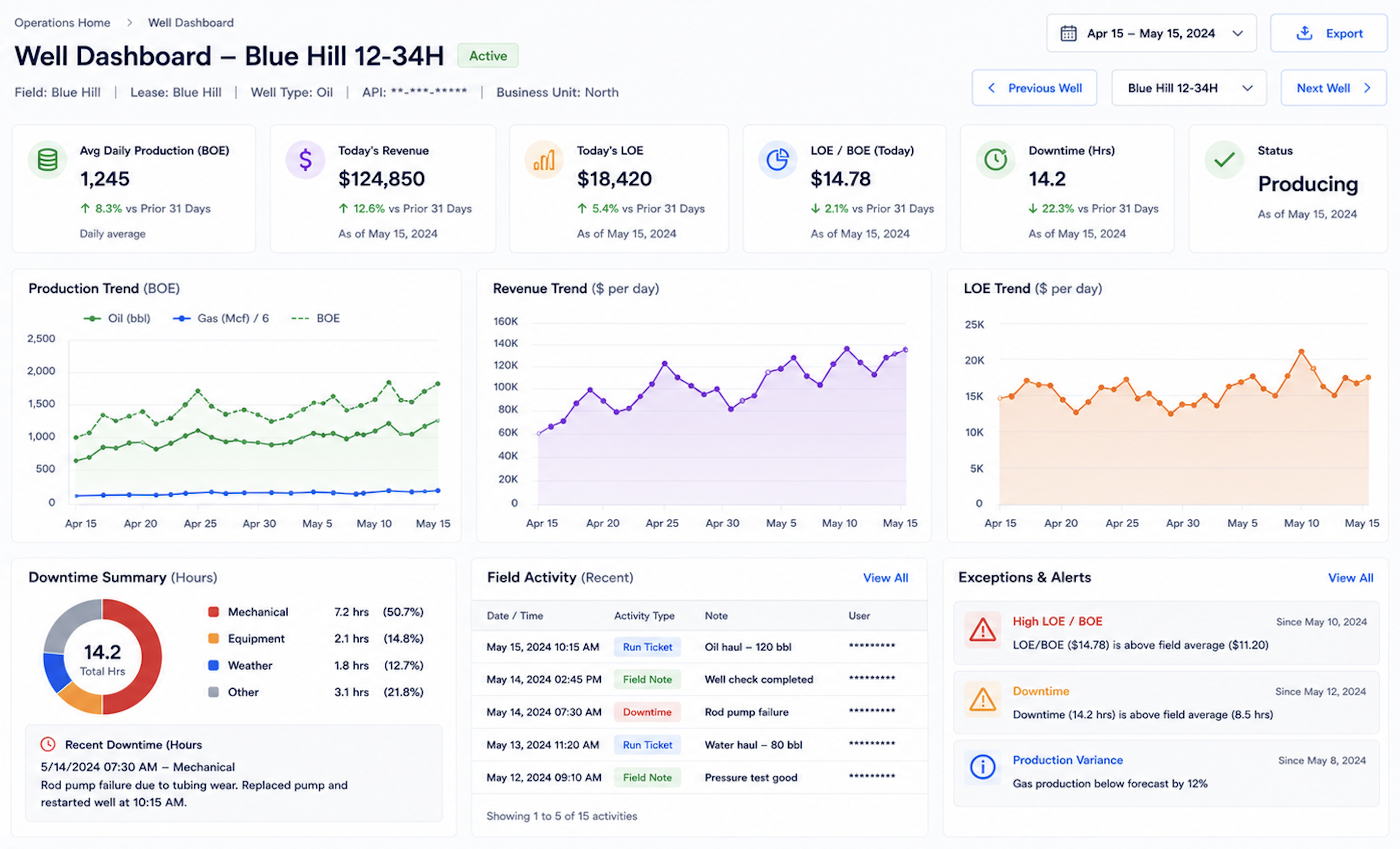
Production data becomes more useful when it is connected with cost and revenue context. A well may show stable production but rising LOE. Another may show declining production while chemical usage and water handling increase. A field may show normal output, but revenue may not match expected sales because run ticket timing or purchaser statements have not aligned.
This is where production reporting moves beyond volume tracking. Operations needs to understand field conditions, while finance needs enough production context to explain revenue movement. Management needs both views at the same time. When production, LOE, run tickets, and revenue are reviewed separately, teams often find the issue late.
A practical well-level view should help teams compare production trend, revenue trend, LOE trend, downtime, and field activity. The purpose is not to create a new accounting metric. It is to make operating signals easier to interpret. If production declines while LOE remains high, the well may need economic review. If revenue declines while production looks stable, the team may need to review run ticket timing, purchaser statements, product movement, or allocation.
Operators should review:
Production by well, lease, or field
Daily and monthly production trends
Run ticket records
Downtime and field notes
Chemical tracking or lease operating details
Cost and revenue context
Missing or late production data
Asset-level performance indicators
Missing Data Should Create a Follow-Up Workflow
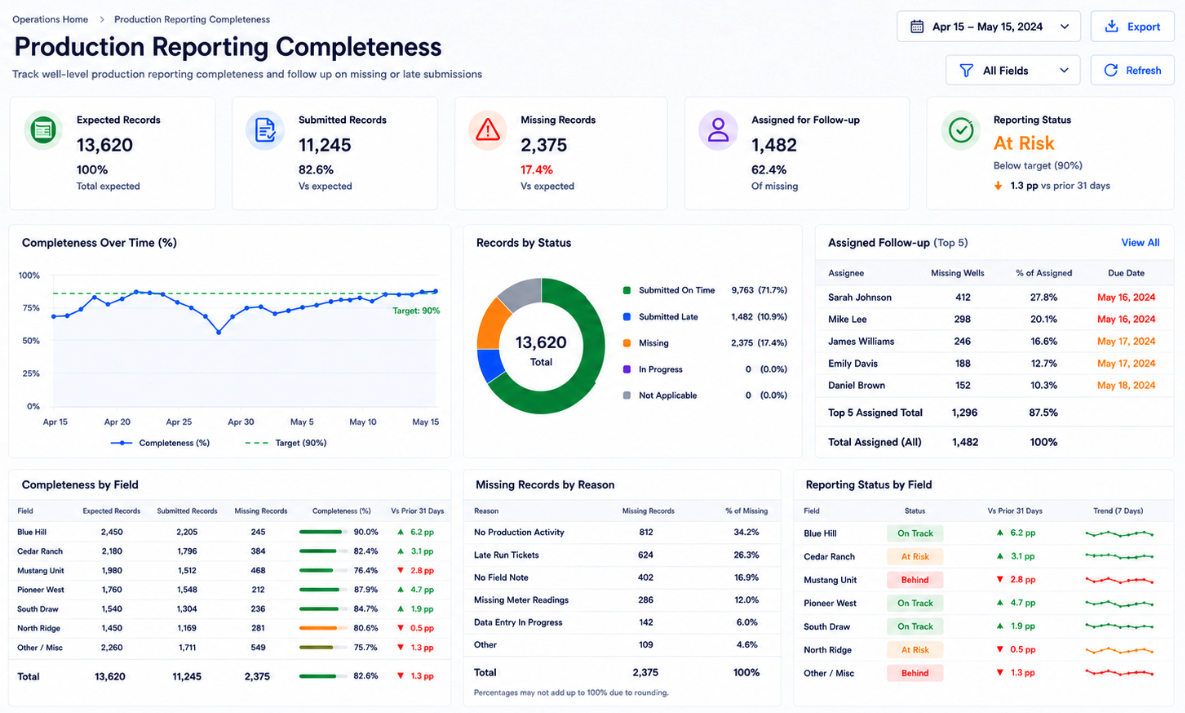
Missing production data is not only a reporting issue. It can delay revenue review, weaken operating analysis, and cause management to work from incomplete information. If active wells are missing records, finance may wait on analysis, operations may miss performance changes, and leadership may not see asset issues until after month-end.
A useful metric is: Production Reporting Completeness = Submitted Production Records ÷ Expected Production Records × 100%. If an operator expects 1,000 production records in a month and receives 930, the completeness rate is: 930 ÷ 1,000 × 100% = 93%. A 93% completeness rate may look acceptable at a high level, but the missing 70 records could represent active wells, high-value leases, or assets with known variance. The risk is not only the number of missing records. The risk is which records are missing and what decisions depend on them.
Production reporting software should show missing records before the cycle closes. Each missing item should have a well, route, field user, expected date, reason, assigned follow-up owner, and reporting status. This turns production reporting from a late-month chase into a controlled operating routine.
Run Tickets Connect Field Movement to Revenue Review
Run tickets add commercial context to production reporting. They can show product movement, volume, purchaser, date, tank, lease, trucked volume, or field location. When run tickets are disconnected from production records, finance and operations may have to reconcile volume movement manually during revenue review.
For example, reported oil production may not match expected revenue because the run ticket was dated differently, the purchaser statement was allocated to another period, or product movement occurred after field production was recorded. That does not automatically mean there is an error. It means the team needs a traceable way to review production movement, purchaser timing, and related revenue context.
A stronger workflow keeps run ticket information close to production and revenue review. The team should see which run tickets are matched, which are missing, which volumes differ from production expectations, and which purchaser records need review. That helps explain timing differences without rebuilding the full record from emails, PDFs, spreadsheets, or separate accounting exports.
A practical run ticket review should answer:
Which production record does the ticket support?
Which well, lease, tank, or field does it relate to?
Which purchaser or hauler is involved?
Which date and production period apply?
Does ticket volume match expected production movement?
Is the ticket connected to revenue review?
Is the mismatch operational, timing-related, or unresolved?
Without this link, production reports show output while revenue teams still investigate the commercial trail. With it, field movement and revenue review become part of the same operating record. Bridging these operational datasets promotes greater cross-departmental alignment, allowing upstream organizations to accelerate the reconciliation process and identify potential volume imbalances well before monthly financial close cycles conclude.
Field Activity Explains What Volume Alone Cannot
Production volume tells the team what changed, but field activity often explains why it changed. Downtime, repairs, chemical treatment, water handling, inspections, route notes, equipment issues, and facility activity can all affect production performance. If those records sit outside production reporting, teams see the result but not the cause.
This matters when production changes are not dramatic enough to trigger immediate concern but still point to a pattern. A well with small recurring downtime, higher chemical treatment, and gradually declining volume can become a performance issue before the monthly report makes it obvious. A lease with repeated field visits and flat production may require cost review even if production has not fallen sharply.
Production reporting software should keep field activity close to the production record. Daily volumes, downtime notes, chemical tracking, lease operating details, run tickets, and review comments should work together. That gives operations and management a more useful picture than volume alone.
Management Needs an Operating Visibility View
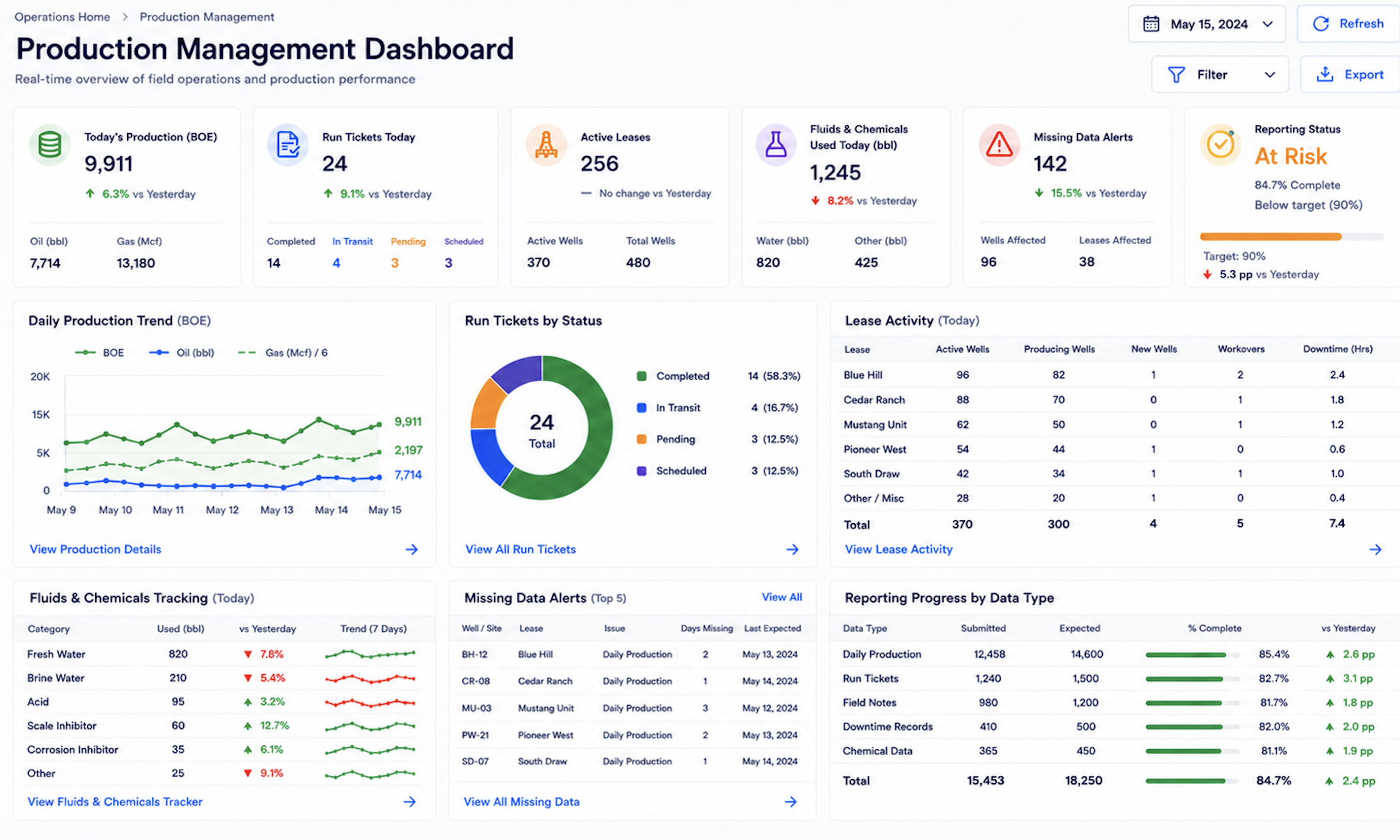
A production report should not only show historical output. It should help management decide where to investigate first. Wells with declining output, repeated downtime, missing records, run ticket gaps, rising operating cost, or revenue mismatch need visibility before month-end reporting is complete.
A useful production management view should answer:
Which wells have material production declines?
Which declines are explained by downtime, maintenance, weather, or field activity?
Which active wells are missing production records?
Which run tickets are missing, unmatched, or inconsistent with production records?
Which wells have stable production but rising LOE?
Which wells show declining production and declining revenue together?
Which field records are waiting for review or correction?
Which asset issue should management act on before the reporting cycle closes?
Without this view, leadership receives production information after the operating window has already passed. With it, operators can see data-quality issues, field performance changes, and asset-level risk earlier. Cultivating this proactive analytical agility allows upstream management teams to deploy timely operational adjustments, thereby optimizing resource utilization and protecting the overall valuation of the asset portfolio.
How Petrofly Connects Production Reporting
Petrofly helps upstream teams organize production management, run tickets, daily production, chemical tracking, lease operating information, and reporting views in a more connected environment. This supports operators that want production records to contribute to better field, financial, and management visibility.
Petrofly supports production reporting through five core capabilities:
Track production data by wells, leases, routes, fields, and reporting periods.
Connect run tickets, daily production, downtime notes, field activity, and operating details to the same record.
Help teams identify missing records, late submissions, review status, and assigned follow-up.
Dashboards for production trends, exceptions, field context, and readiness.
Cloud configuration, shared views, and reports tailored to production.
Without this structure, production reporting becomes a monthly file assembled after field activity has already moved on. With Petrofly, operators can connect production data, run tickets, field context, and management reporting before month-end. Embedding this synchronized visibility within the accounting timeline helps upstream organizations capture volumetric operational realities more precisely, providing a reliable operational foundation that enhances strategic governance and financial close workflows.
Make Production Data Useful before Month-End
Production reporting software helps operators turn field records into useful operating visibility. When production volumes, run tickets, field notes, cost context, revenue movement, and reporting status are connected, teams can identify production changes, missing records, and performance questions earlier. The value is not only better reporting; it is better decision timing.
Production data should not become useful only after monthly reporting is complete. Each daily record should help explain asset behavior, revenue movement, field activity, or reporting readiness. Petrofly can support upstream operators that want production reporting to become part of a more connected operating workflow.
Production reporting without context becomes another monthly file; connected production reporting becomes an operating visibility system. To discuss how Petrofly can support a more integrated, controlled production tracking and operational reporting workflow, contact our team for a focused conversation. Evaluating this centralized digital platform firsthand assists upstream operators in bridging data silos, optimizing multi-departmental compliance alignment, and maintaining a high standard of data fidelity across their asset portfolios.